
AI App Builders and the 404 Nobody Tests For
 Michael Brown
August 8, 2026 • 8 min read
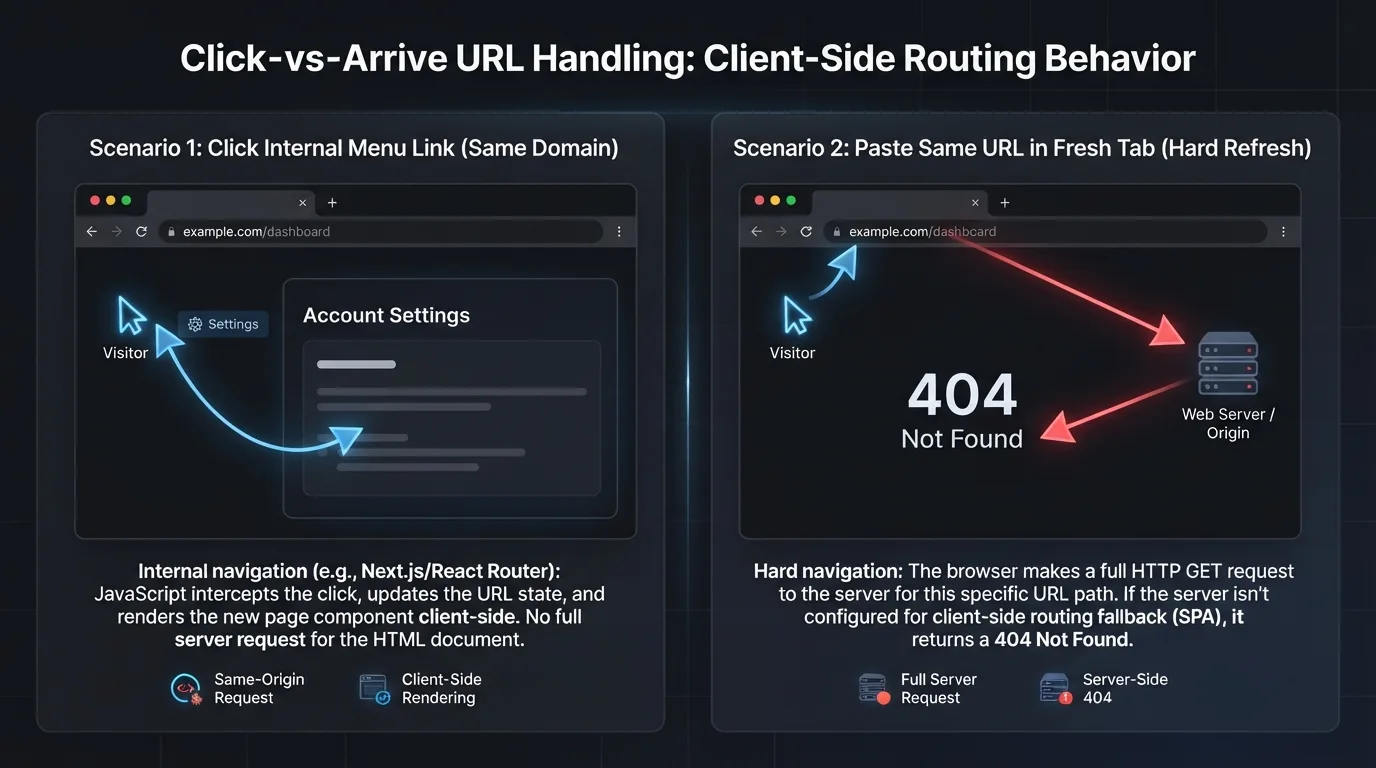
Someone sends you their website. You click through it and everything works. The menu goes where it should, the pages load instantly, nothing breaks. Then you copy the address of the services page, paste it into a fresh tab, and get a 404.
That happened to a site I was asked to look at last week. Four of its five pages were unreachable this way. The owner had no idea, because the owner had never once arrived at the site from outside it.
The short version. Some modern websites are built as a single file that rewrites itself as you click around. Clicking works. Arriving from outside does not, unless the web host has been given one specific instruction. Without it, every page except the homepage returns "not found" to anyone who arrives from a search result, an email, or a shared link.
Nothing on the site looks broken. No error appears anywhere the owner would see it. The only symptom is that traffic never arrives.
Why one page can pretend to be five
A traditional website keeps a separate file for each page. Ask the server for the services page and it hands over the services file. Simple, and it works from anywhere.
A large share of sites built in the last few years work differently. The whole site is one file. When you click a menu item, nothing is requested from the server at all. A script already running in your browser swaps the content on screen and rewrites the address bar to match. It feels faster because no round trip happens.
The catch appears the moment a request skips that script. Type the address, click a link in an email, or follow a search result, and the browser asks the server directly for something called services. The server looks for a file with that name.
There isn't one, because there is only ever one file. So it answers 404.
This is not a flaw in the tools that build these sites. It is a deployment step, and it is the one that gets skipped, because everybody tests a new site by clicking through it. The failure only shows up on the path nobody tests.
Thirty seconds to find out
Open a page that is not your homepage. Copy the address. Open a private or incognito window and paste it in. If you get an error, you have this problem. If it loads, you do not.
That test is enough for most people. If you want the actual server response rather than the rendered page, which matters for a reason covered in a moment, run the address through a header checker. What you are looking for is a single line:
# The status code is the whole answer.
# 200 means the page exists. 404 means it does not.
# -s silences the progress meter, -I asks for headers only.
curl -sI https://example.com/services | head -1
Our HTTP Header Checker gives you the same answer without a terminal, along with the full redirect chain if the address bounces through several hops before landing.
The one line that fixes it
The repair is a configuration setting, not a code change. It tells the server that when it is asked for an address it does not recognise, it should hand over the main file and let the site's own script sort out what to display. Nothing about the design or the content changes.
Which file you need depends on where the site is hosted. If you are not sure, the response headers usually give it away: x-vercel-id means Vercel, x-nf-request-id means Netlify, a nd server: Apache or server: nginx means conventional hosting.
Netlify
A file named _redirects, no extension, in the folder you publish.
# Serve index.html for any path that is not a real file.
# The 200 matters. A 301 would change the address in the bar
# and the site's router would then see the wrong URL.
/*    /index.html   200
Vercel
A file named vercel.json at the root of the project.
{
  "rewrites": [
    {
      "//": "Match everything EXCEPT api routes, the build assets folder,",
      "//": "and any path containing a dot, which catches sitemap.xml,",
      "//": "robots.txt and image files. Without that exclusion those",
      "//": "requests would also be handed the HTML shell.",
      "source": "/((?!api/|assets/|.*\\..*).*)",
      "destination": "/index.html"
    }
  ]
}
Apache
A file named .htaccess in the web root, beside index.html. If one already exists, add this block rather than replacing the file.
# .htaccess
<IfModule mod_rewrite.c>
  RewriteEngine On
  RewriteBase /

  # Leave real files and real directories alone. This is what keeps
  # your images, stylesheets, robots.txt and sitemap.xml working.
  RewriteCond %{REQUEST_FILENAME} !-f
  RewriteCond %{REQUEST_FILENAME} !-d

  # Everything else gets the main file. [L] stops further rules.
  # The address in the bar is unchanged, so the site's router
  # still sees /services and renders the right thing.
  RewriteRule . /index.html [L]
</IfModule>
nginx
Inside the existing server block. This one needs server access and a config reload.
location / {
    # Check for a matching file, then a matching directory,
    # then fall back to index.html. Same effect as the Apache
    # rules above, in one line.
    try_files $uri $uri/ /index.html;
}
The change that looks like a fix and is not
There is a second way to make these pages load, and it is worth naming because it is the more tempting one. On Apache, a single line pointing the 404 error document at the main file will make the page appear correctly in a browser.
It also leaves the response as 404. A person sees a working page. Every search engine and every AI crawler sees "not found" and drops the URL. The site now looks repaired to the only party who cannot detect the problem, which makes it harder to find than it was before.
Verify the status code, not the page. After any fix, check the response rather than trusting your eyes. It must read 200. If it still reads 404 while the page displays correctly, the wrong repair was applied.
One honest trade-off comes with the correct fix. Once the fallback is in place, a genuinely wrong address returns 200 and the app shell instead of a real 404. For a small site that is unlikely to matter. On a larger one, configure the router to return a proper 404 status for routes it does not recognise.
What it costs while it is broken
Search engines discover pages by requesting them. A page that answers 404 is recorded as gone and is not indexed. If the site also has no sitemap, which is common with this kind of build, there is no route by which any page beyond the homepage could be found at all.
The same applies to the AI assistants people increasingly ask for recommendations. They fetch pages over the same protocol and get the same 404. A page that cannot be fetched cannot be summarised, cited, or recommended. That is a separate question from whether those crawlers can read your content once they reach it, which we covered in Can ChatGPT Actually See Your Website.
Then there is the traffic nobody counts. Every link shared in an email, a message, or a social post lands on an error page. Those visitors do not report the problem. They close the tab, and the site's analytics record a bounce on a URL the owner believes is working fine.
If you have never opened your own site from a fresh tab, that test takes less time than reading this sentence did.
Common questions
Does this mean the site was built badly?
Why does the page work when I click the menu but not when I paste the address?
Will fixing it change how the site looks?
How do I know which configuration file I need?
x-vercel-id, Netlify adds x-nf-request-id, and
conventional hosting usually reports Apache or nginx in the server header. A header checker will show you these.